
Euri Gilberto Herasme Cuevas
Euri Gilberto Herasme Cuevas
Procedural Obstacle Placement
Procedural Obstacle Placement Using Rewriting Systems. The awesome 3d models that appear on the following videos were made by @KayLousberg ,and are taken from their mini game variety pack Avilable Here .
Unity
C#
HLSL
Prefab
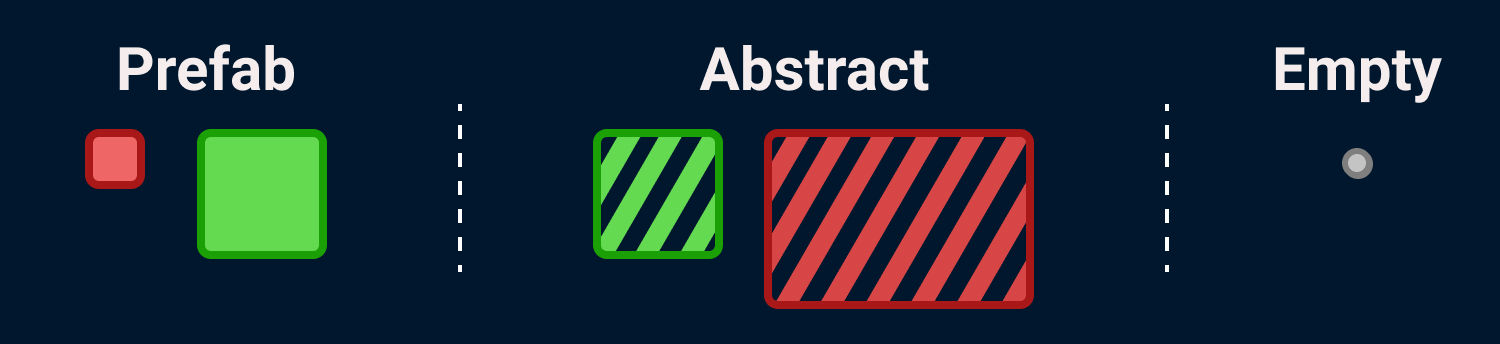
Prefab elements represent objects that are going to be placed in the
level. The size of these elements should be the same as the size of
the object it represents, the size should be scale according to the
cell size of any given system (e.g. Object size is 2x2 and cell size
is 2 then the prefab element size should be 1x1).
Abstract
Abstract elements describe some concept, for example a “hard
section”, “easy section”, “rocky section”, etc.Because of how the
transformation rules work technically a collection of prefab nodes
could also be used to reference a section and transform it
accordingly, but we could run into a problem by doing this because
multiple sections could have the same prefab configuration by chance
and the rule be applied somewhere it was not supposed to.
Information on how they are represented in a level is given in a
later section.
Empty
Empty elements exist in the absence of any element, if present in
the level graph they are represented as empty space.
Grid
A grid is a collection of elements that come from a specific element
collection. The height of the grid can go from 1 to the max height
(that max height comes from EC) and the width is unconstrained. The
position of the elements in the grid is defined as the top left grid
cell the element occupies.

Level Template
A level template is a grid that is meant to be used as the initial
value for the level generation. All of the elements can be placed
(prefab, abstract, empty) and the height has a constant value of the
maximum height set in the element collection. As the initial value,
it should be created considering the rules that are going to be set
on the level generator, because if the template does not contain any
sub grid contained in the rules, then no rule is going to be
applied.

Transformation Rule
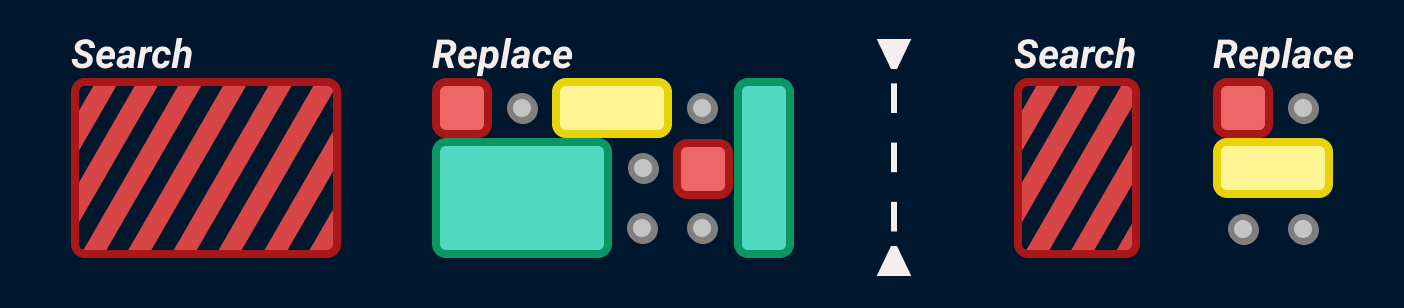
A transformation rule has a “search” grid and a “replace” grid, the
height of the search and replace grid have to be the same and the
width can be different. The grids can contain any element type.

Definition Rule
Subtype of transformation rules. These rules are used to define
abstract elements. The “search” grid of a definition rule only
contains a single element (the abstract element this rule is
defining) and the “replace” part can only contain empty or prefab
elements. The height of the rule is defined by the abstract element
and the width is unconstrained. There can be an indefinite amount of
definition rules but it would be advisable if all of them share the
same “theme”, for example in the abstract element is named “bomb
section” then a bomb should always be the most important element in
the “replace” grid, if it is called “easy section” then easily
clearable obstacles and abundant empty space should always appear in
the “replace” grid.

Step 1
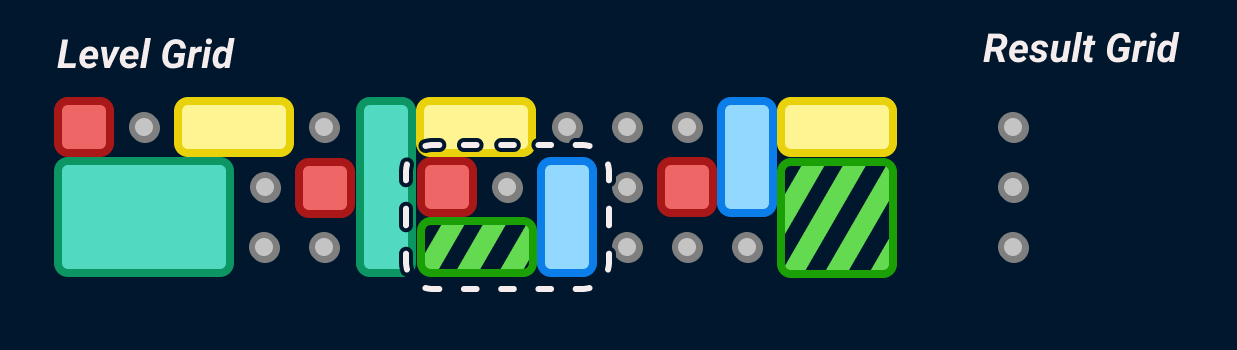
Search for a sub grid that has the same configuration as the search
part of the rule. If one is found, generate another grid to hold the
results. It should have the same height and 1 as width.
Step 2
Add all the elements that are positioned to the left of the last
column the rule occupies, excluding the element in the sub grid.
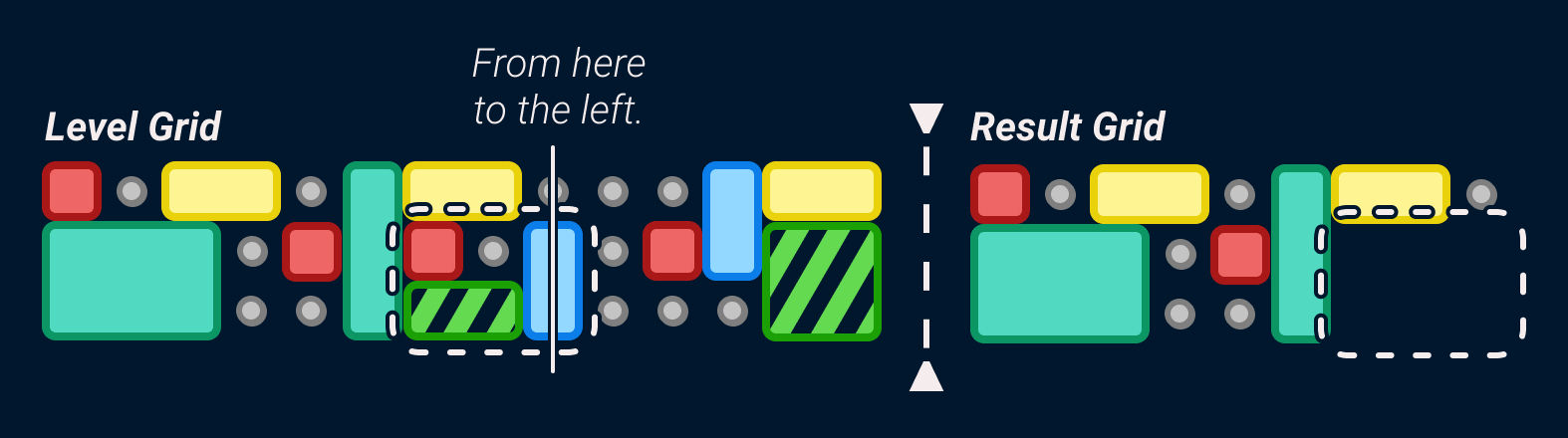
If the width of the “replace” grid is greater or equal to the “search” grid. Starting in the column to the right of the found sub grid, check if the width the sub grid takes could be increased without destroying any prefab or abstract elements. Let’s call this "available width". In this case the width can be increased by one without destroying any prefab or abstract elements.
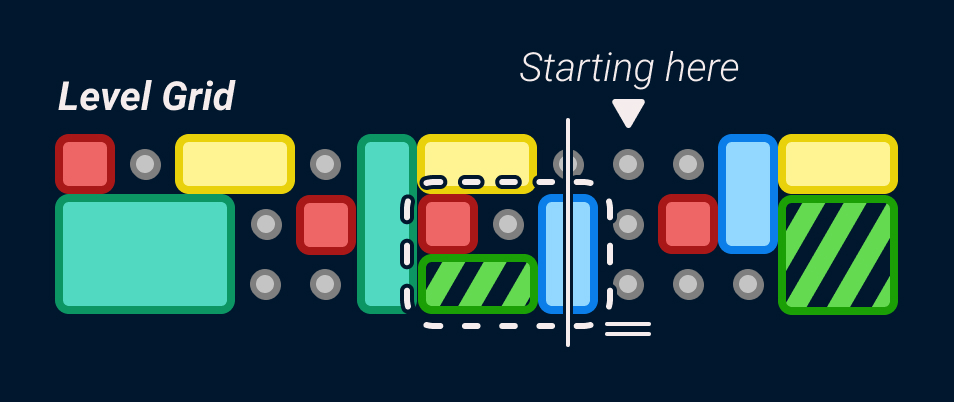
Step 3
Let's add all the other elements (excluding the ones from the
“search” / “replace” grid) to the result grid.
There are 3 possible scenarios that the system could run into in
this step:
sw = rw
The width of the 'search' and 'replace' sides of the rules are the same in which case just keep adding the rest of the elements as usual
sw < rw
In this case the system has to exapnd the space between the right most side of the search rule and the first left most element after the search column until the widths, match, by adding more columns in between
sw > rw
In this case the system has to contract the graph pulling the elements in the order they appear until pulling an element would make it overlap with an unaffected element. The elements above and below the search space are not affected by this. A visual presentation of this scenario is presented later
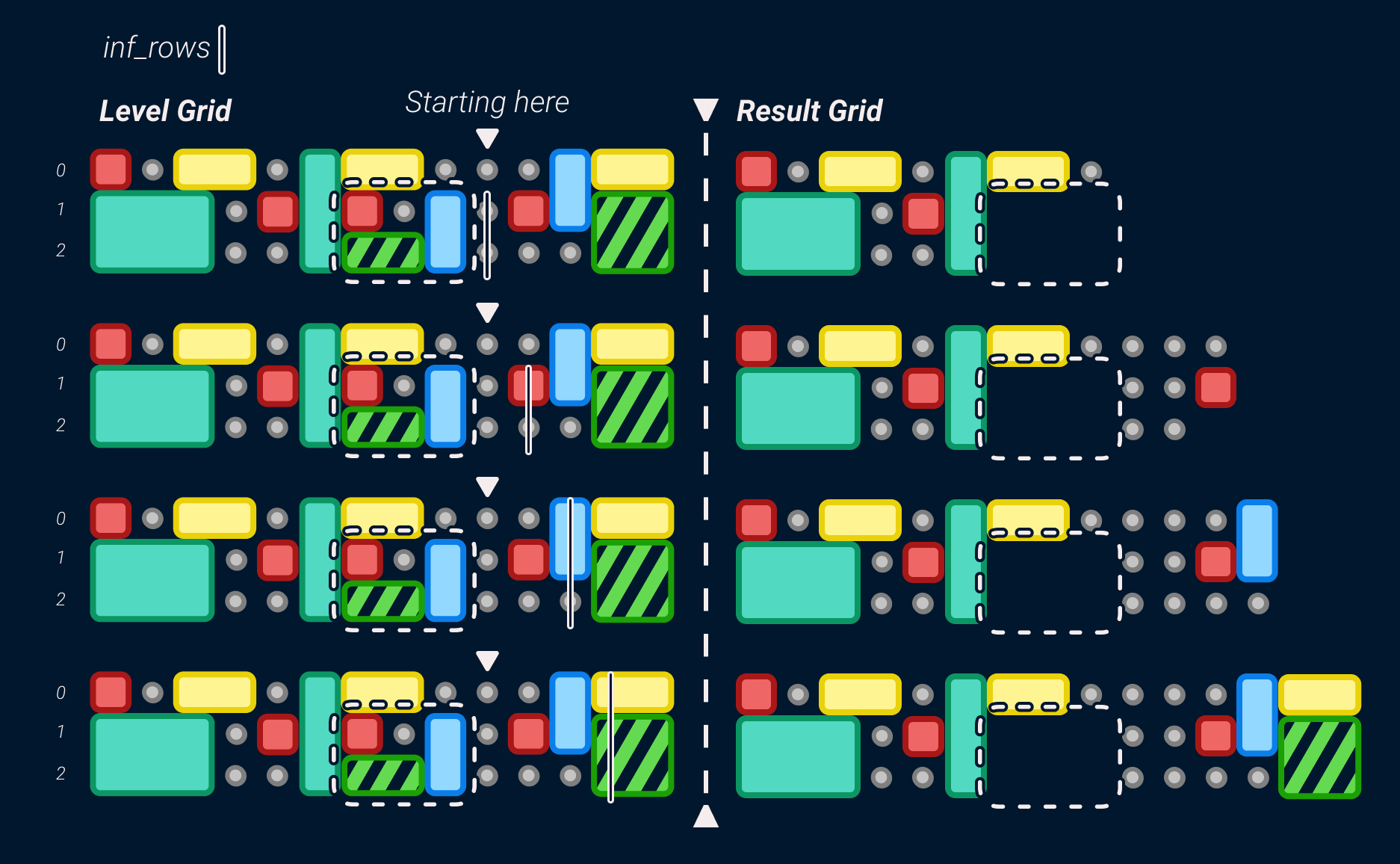
Step 4
The last step is to add the replace side of the rule in the
available space. Because of how empty nodes are treated, you might
find that gaps between 'sections' are removed. There is no sure way
to "solve" this as this is one of the weaknesses of how the rules
rewriting is only applied locally.
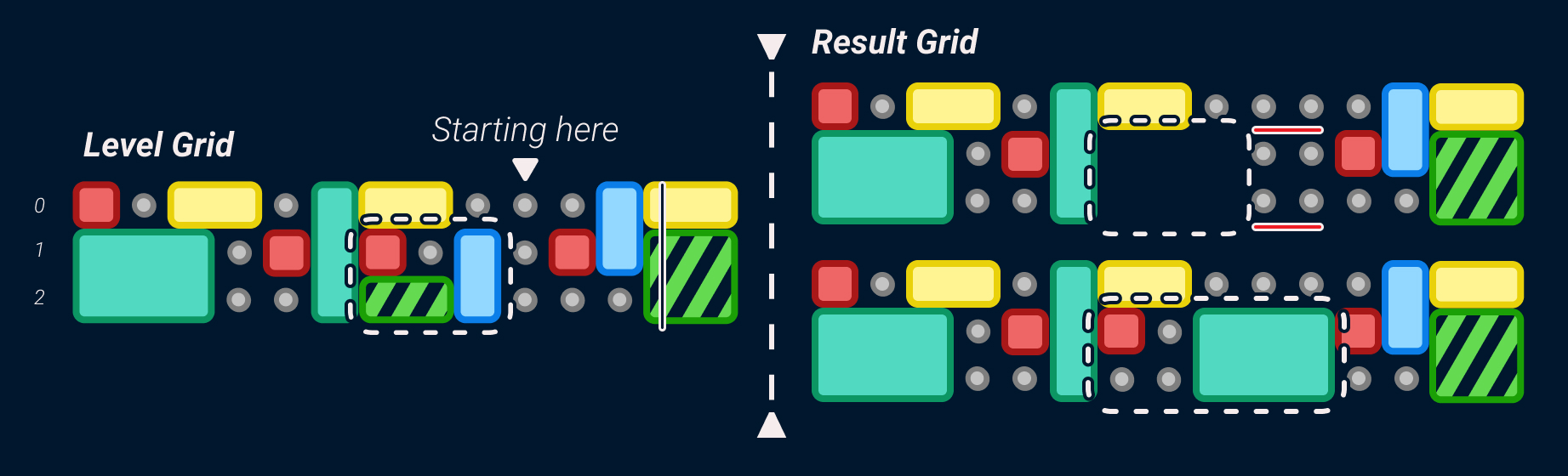
Example of sw > rw
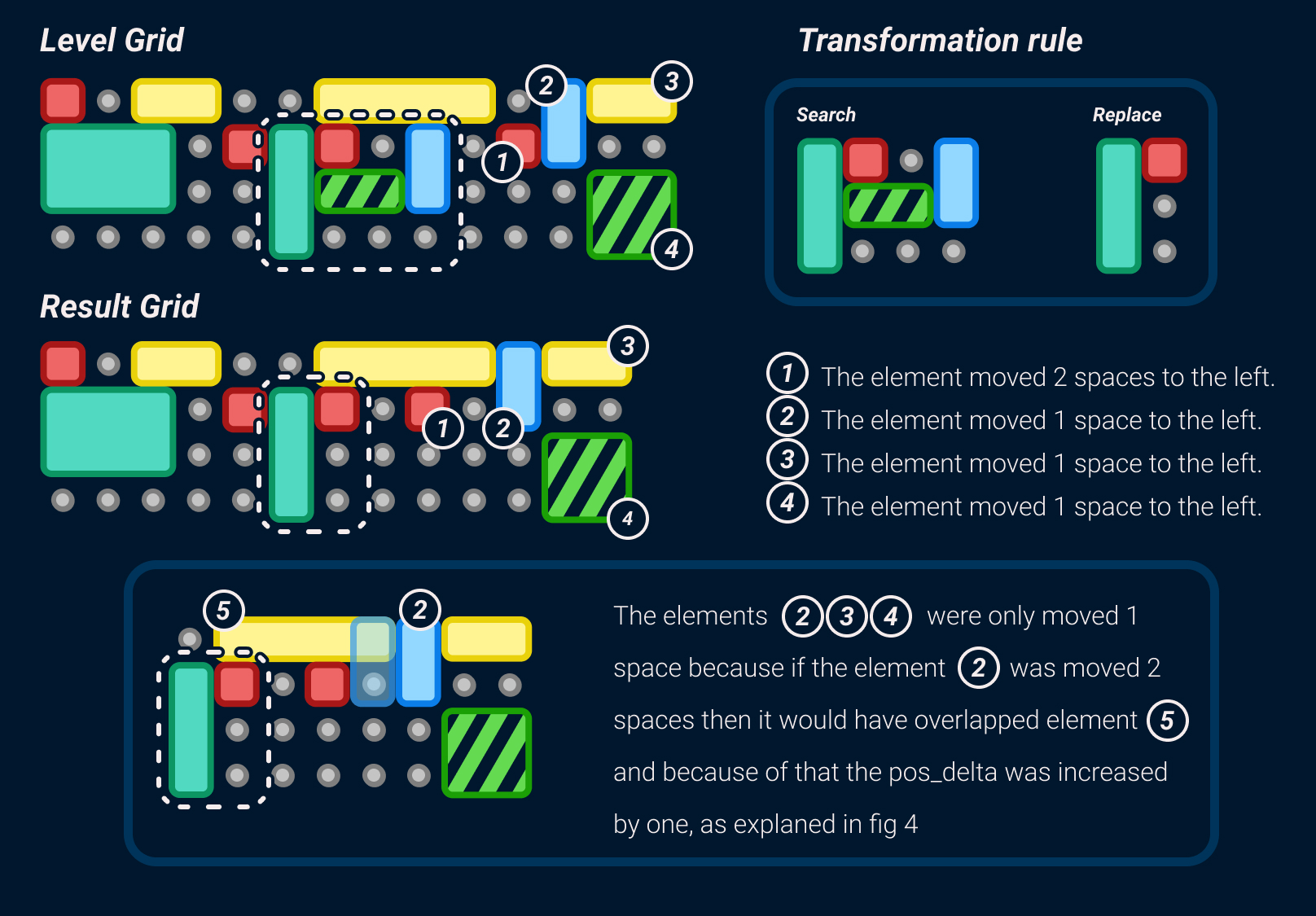
3d Level Generation
The level grid generator is used to generate grids that are meant to
represent levels. There are 3 steps to generate a level:
1
A random level template is selected from the template list and a grid is generated from it.
2
All the transformation steps are applied to the generated level.
A transformation step contains a list of rules, and an int2 that
represents the minimum and maximum amount of times the rules can
be applied. First an application count is randomly selected from
the range, then a rule is randomly selected and applied that
many times.
Transformation step
Rule List - { Rule1, Rule2, Rule3 }
Application Range - ( Min , Max )
3
If there are any abstract elements left, then randomly selected default transformation rules are selected from each one, this is done in the order shoun in the image. (remember that an element position is the top left corner).